D180 Software Architecture
| Document status | 35 - Reviewed |
|---|
The Software Architecture must describe how the solution is built, including which frameworks are used, and which design principles and patterns that are applied.
DataHub Market Communications (DMC)
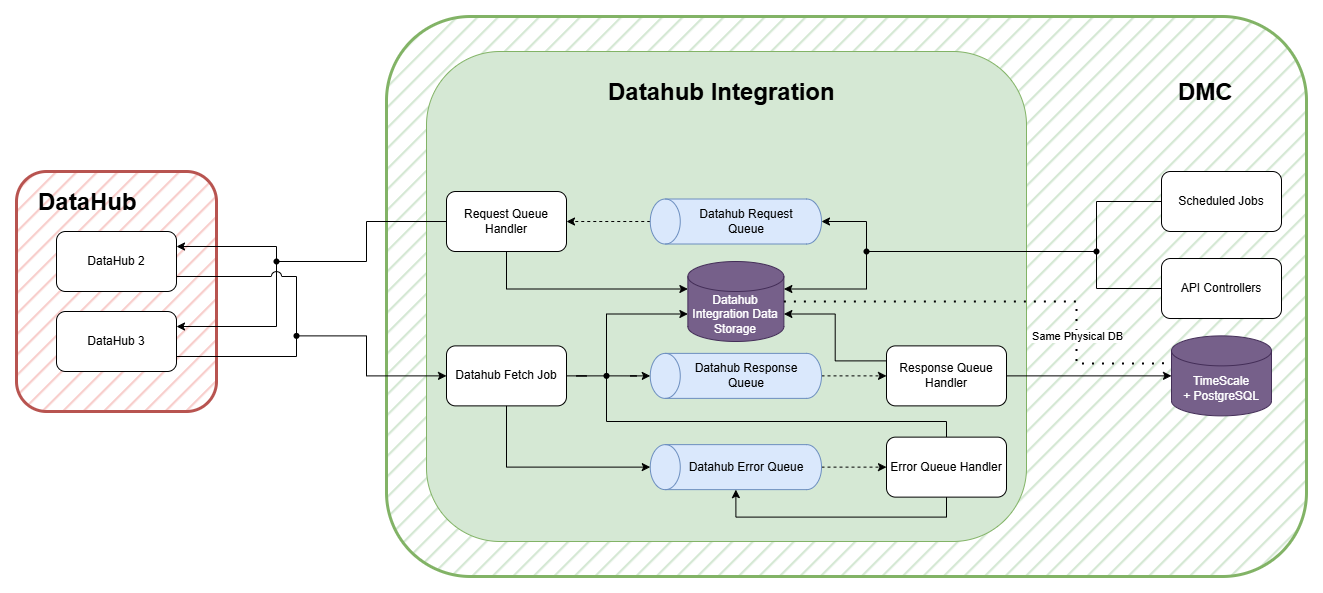
DataHub Integration
The DataHub Integration is a subcomponent of the DMC Module. It allows sending and receiving data, to and from EnergiNet's DataHub.
Data Flow Description:
- A Scheduled Job or an API wants to send a message to DataHub. It does this by storing the data that it want to send in the Integration Data Storage and add as message to the Request Queue with a reference to the data.
- The Request Queue handler picks up the message and sends the data to DataHub. DataHub responses with a synchronous message that is either a Message Accepted or a Validation Error.
- The synchronous response is sent to the Response Queue.
- For requests where we just send data to DataHub we don't excepts a asynchronous response, the flow stops here
- For requests where we are requesting data, we have to wait for an asynchronous response.
- The DataHub Fetch Job periodically checks for asynchronous responses from DataHub on another endpoint. The endpoint acts as a queue where we can peek and dequeue messages.
- DataHub might also send us data without us requesting it. That data shows up on the same queue.
- If a response is fetched from DataHub, we store the response data in the Integration Data Storage and add it to the Response Queue.
- If an error occurred with a message during the Fetch Job it's added to Error Queue instead.
- The Response Queue handler then picks up the message and takes the required actions.
- The Error Queue handler retries to add the message to the Response Queue.
- Common to all Queue handlers is that they all retires each message 3 times with some delay in case of errors. If the message still can't be processed after 3 tries it's added to a Deadletter queue.